

Updating Your Profile on Akkad
12/05/2026

The Akkad Attestation Platform allows users to easily update their profile information to ensure that account details remain accurate and up to date while using electronic attestation services. Keeping your profile updated helps:
- Receive notifications and alerts correctly
- Improve communication with applicants
- Ensure accuracy of submitted applications
- Enhance the overall user experience
How to Update Your Profile
- Log in using your registered email address and password.
- From the main menu, navigate to Profile
- Update the required information and ensure all entered data is correct.
- After completing the updates, click Save, your profile information will then be updated successfully.
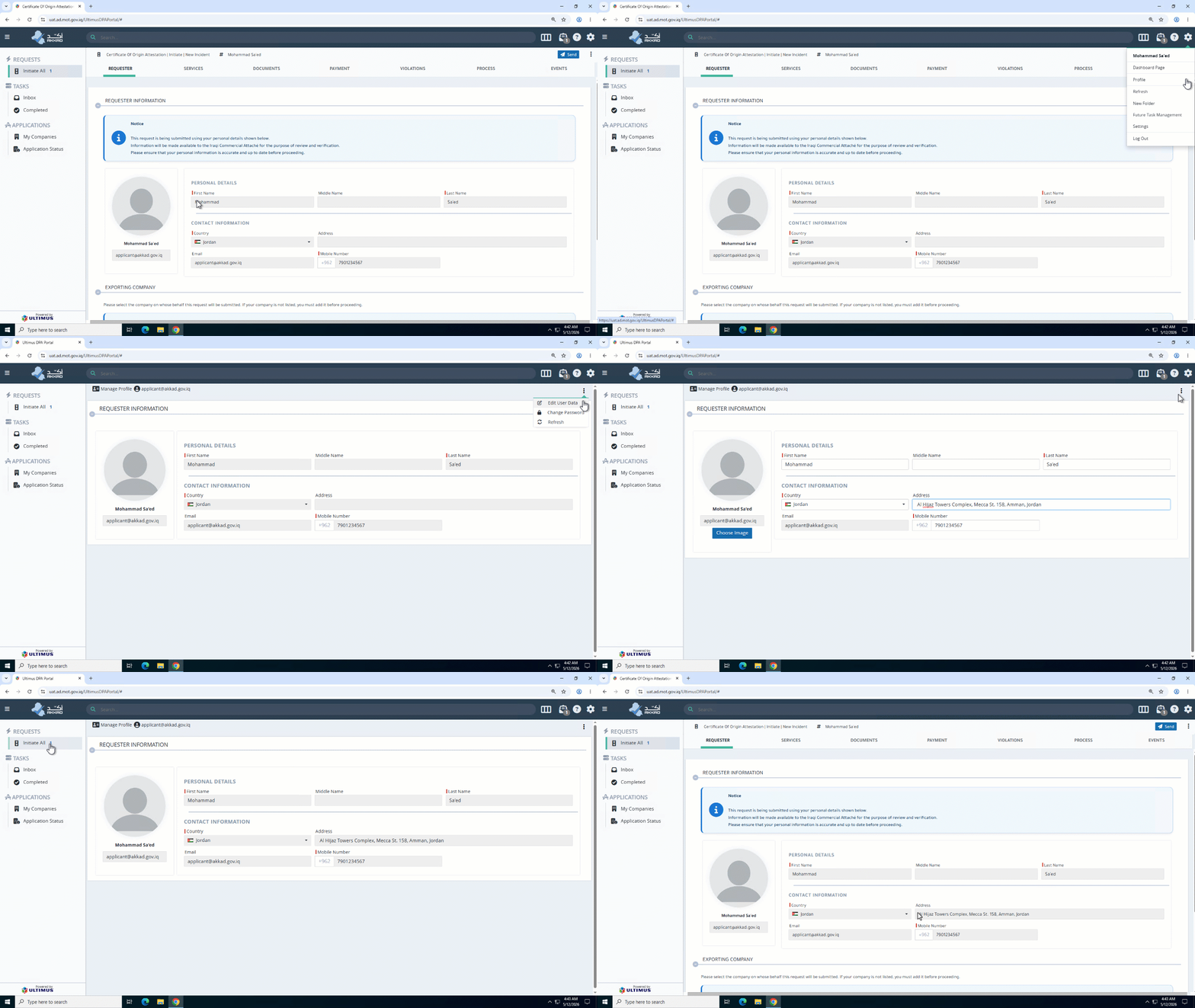
Important:
Please ensure that all personal information registered in your account is accurate and up to date, as it may be used during verification and attestation procedures. It is also recommended to use a valid email address and an active mobile number to ensure successful delivery of all notifications related to your applications.
How to Update Your Password
1. Log in using your registered email address and current password.
2. From the main menu, navigate to Profile
3. Select “Change Password”
4. Enter the Required Information, you will be asked to enter: Current password, New password and Confirm new password
5. After entering the required information, click Save, your password will then be updated successfully.
Password Requirements
For better security, it is recommended that your password includes Uppercase and lowercase letters, Numbers, Special characters and Sufficient length. Avoid using weak or commonly used passwords.